

3D Laser Wood Engraving Guide: Achieving 3D Effects with a CO2 Laser Engraver
What is 3D laser engraving wood?
3D laser wood engraving is a technology that uses a high-energy laser beam to create three-dimensional effects on or inside the surface of wood. By precisely controlling the laser's power, speed, and focus position, it can "carve" relief effects with depth and layering into the wood, transforming flat images (such as photos or grayscale images) into lifelike, three-dimensional artwork.
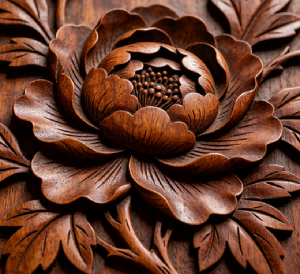

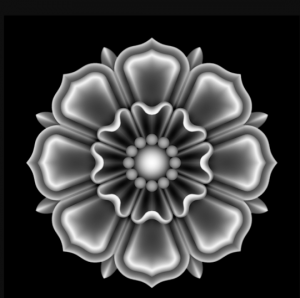
There are essential differences in 3D laser relief engraving and general 2D laser engraving: 3D relief engraving is based on grayscale maps or height maps, using real-time laser power variation to etch smooth depth gradients on the material surface, thereby producing three-dimensional concave-convex layers and a sculptural texture. In contrast, 2D laser engraving uses constant laser power to ablate marks of a single depth, representing only lines, text, or flat graphics. Although it is fast and low-cost, it lacks depth gradation and perspective, and is mostly used for product logos, serial numbers, and other practical marking tasks.
Why choose CO2 laser for 3d laser engraving wood?
High absorption efficiency and precision – The wavelength of a CO₂ laser (10.6 μm) is perfectly matched to the molecular structure of wood, allowing the energy to be efficiently absorbed rather than reflected. When using a co2 laser engraver for wood, this high efficiency translates into clean, precise results. Combined with a high-precision motion system, machining accuracy can easily reach 0.02 mm or even higher, which is essential for complex 3d laser engraving wood projects.
Superior 3D effect and material compatibility – Machining wood with a CO₂ laser is essentially a controlled “vaporization” process. High-power CO₂ lasers can achieve greater engraving depth and richer texture layering, making them the first choice for creating three-dimensional effects. Moreover, CO₂ lasers can process almost all common types of wood, both softwoods and hardwoods.
Cutting capability and efficiency – CO₂ lasers are not only good for fine engraving but also for cutting, especially for wood boards or workpieces thicker than 6 mm. When producing 3D wood engravings in batches, the high processing speed significantly shortens turnaround times.
Balance between technology and cost – CO₂ laser technology is mature, offers a wide range of options, and covers many application scenarios. The equipment price is generally more economical than that of a fiber or UV laser of comparable power. In terms of material compatibility and results, it is also significantly better than entry‑level diode lasers.
Which wood is best for 3D laser engraving?
| Wood Type | Key Advantages | Best For | Precautions |
|---|---|---|---|
| Basswood | Uniform, fine texture; moderate hardness; very forgiving, not easy to burn; ideal for beginners | Detailed portraits, pet reliefs, models, small crafts | Avoid excessive power, otherwise fine details may get lost; light sanding recommended after engraving |
| Maple | Light‑colored, high density; excellent contrast, crisp and sharp engraving like an ink drawing | High‑clarity text, logos, photo engravings | Higher density requires moderate power increase; ensure proper ventilation to avoid surface residue |
| Cherry | Warm reddish tone; engraving naturally darkens over time; premium look, uniform depth | High‑end gifts, award plaques, home décor | Natural color change after engraving should be considered; test speed/power to avoid overburning |
| Birch Plywood | Flat surface, stable, great value, ideal for batch production | Signs, coasters, templates, products needing consistency | Check for internal glue layers; low‑formaldehyde glue ensures cleaner cuts; use air assist for less charring |
| Black Walnut | Excellent 3D relief effect, especially for topographies / landscapes | Art pieces, high‑end custom work, vintage‑style projects | Dark wood may reduce contrast; more passes or higher power needed for deep 3D relief; expensive, test first |
Recommended parameters for 3D laser engraving wood
Power – Determines engraving depth and darkness. For fine images, low power (e.g. 15–25%) is often enough to vaporize the wood surface. Too high power causes burning and loss of detail.
Speed – Affects how long the laser stays on the material. High speed (e.g. 300–600 mm/s) is for shallow, fine engraving. Low speed (e.g. 200–300 mm/s) is for deep 3D engraving, but must be combined with air assist to prevent combustion.
Frequency (PPI) – How densely laser pulses are delivered. Lower frequency produces deeper engraving, which is beneficial for 3D work.
DPI – Determines the level of detail in raster engraving. For photo-realistic engraving, set between 300–600 DPI.
| Goal | Wood Type | Thickness | Power (%) | Speed (mm/s) |
|---|---|---|---|---|
| Fine photo / pattern | Basswood / Maple | 3mm | 30–40% | 550–650 |
| Fine photo / pattern | Walnut / Cherry | 5mm | 40–50% | 450–550 |
| Deep 3D relief | Walnut / Oak | 5–6mm | 65–75% | 200–300 |
| Deep 3D relief | Birch Plywood | 3mm | 55–65% | 250–350 |
| General reference | Most light‑colored woods | – | 50–70% | 300–500 |
Preparation for 3D laser engraving wood
Select & Prepare Wood
- Choose suitable wood for laser engraver machine for wood
- Flat, dry, dust‑free surface
- Lightly sand & wipe clean
Prepare Grayscale Image
- Convert to grayscale (Photoshop / GIMP / LightBurn)
- Adjust contrast for clear tonal range
- Apply dithering (Floyd‑Steinberg)
- Set 300–600 DPI for 3D laser engraving
Set Up Laser Engraver
- Use CO2 laser engraver for wood (40W–100W)
- Clean lens & mirrors
- Turn on exhaust + air assist (key for depth)
- Wear safety glasses
Secure & Focus
- Fix wood flat on bed (tape / clamps)
- Set precise focus on surface
- Slight defocus for deeper relief
Test Parameters & Output
- Always test on scrap piece first
- Start: 50–70% power, 300–500 mm/s (40–60W CO₂)
- Import grayscale → “3D mode”
- Check engraving boundaries
Practical steps for 3D laser engraving on wood
Practical Steps for 3D Laser Engraving on Wood
- Power on & positioning – Turn on the laser and exhaust system; secure the wood on the bed and set focus.
- Import file – Open the grayscale image in your laser software and select “3D mode” or “grayscale mapping”.
- Run engraving – Click “Frame” to preview the engraving area, then press “Start”. Stay near the machine at all times.
- Multiple passes (optional) – For deeper relief, set 2–3 repeating passes in the software.
- Remove finished piece – After engraving, gently wipe off soot with a soft brush or damp cloth, then take out the wood.
- Shutdown & cleaning – Turn off power, clean the lens with alcohol and lens tissue, and clear debris from the workbed.
Not sure how to operate 3D laser engraving on wood? Watch this video to learn more.
A complete collection of laser engraved wooden crafts. Click to learn more.
Recommended machines for 3D laser engraving wood wood
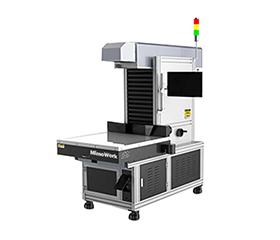
Galvo Laser Engraver & Marker 40
| Aspect | Specific Performance (Based on Provided Materials) | Evaluation / Suitability for Small Decorative Items |
|---|---|---|
| Engraving Speed |
3D dynamic focusing Max working field up to 400×400 mm, fast scanning |
✓ Very fast – ideal for batch production of small decorative items (pendants, keychains, badges). Quick response to custom and batch orders. |
| Relief Effect |
|
✓ Achieves craftsmanship quality – fine details, clear concave‑convex texture. Suitable for wooden photo engravings, commemorative plaques, jewelry box lids. |
Besides 3D laser engraving on wood, we also have laser cutting projects. If you're interested, click below.
FAQ
A:Yes, using grayscale mapping and variable laser power to create depth, producing relief like 3D effects on materials like wood and acrylic.
A:No, a standard 3D printer (FDM) adds material, while laser engraving removes material. However, some hybrid machines (e.g., Bambu Lab H2D) include a laser module for engraving.
A:Yes, LightBurn supports 3D engraving via its “Variable Power” mode, which reads grayscale images to adjust laser power and create depth.
A: 2D laser engraves constant depth (binary on/off), while 3D laser varies power to produce multiple depth levels, creating relief and shading.
Do you have any questions about 3D laser engraving on wood? Contact us.
Post time: Jun-05-2026