

How to Fix Hazing on Two-Tone Acrylic Laser Engraving and Cutting
Why Does Two-Tone Acrylic Haze During Laser Cutting and Engraving?
Hazing is not a defect in your material; it is a natural byproduct of the laser process.
When you cut acrylic with laser beams, the intense heat doesn't just melt the plastic—it causes the acrylic to instantly vaporize into a gaseous state. This vaporized acrylic monomer smoke is highly viscous and sticky. If your exhaust system doesn't pull it away fast enough, or if improper airflow causes it to swirl back onto the sheet, the smoke will rapidly condense, turning back into microscopic solid particles as it cools.
This results in that frustrating layer of white, frosted powder residue you see on your material. Because two-tone acrylic relies on a micro-thin top layer with high color contrast, these condensed particles can significantly affect the final appearance.
Proven Methods to Fix and Prevent Acrylic Hazing
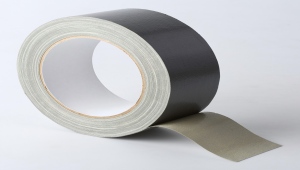
1. Keep the Protective Masking On
The single most effective defense is physical isolation. Never engrave bare two-tone acrylic. Leave the factory paper backing on, or apply high-quality, low-tack paper masking tape (Laser Masking Film) over the surface before processing. The vaporized acrylic will condense onto the paper instead of your material. Simply weed out the paper after cutting to reveal a flawless finish.

2. Implement the Air Assist "Toggle" Strategy
Your acrylic laser cutting machine's air assist is a double-edged sword:
- During Engraving: Turn the air assist OFF or down to a minimum. High-pressure air will act like a fan, scattering the freshly vaporized hot powder across the sheet and forcing it into the unmasked grooves.
- During Cutting: Turn the air assist HIGH. When cutting all the way through, you need strong air pressure to blow the melted residue downward out of the cutting slot and prevent flare-ups.
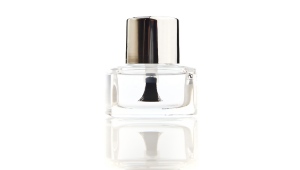
3. Clear Nail Polish Trick for Engraved Areas
If your engraved dual-color area looks slightly frosted or dull and you want a glossy, sealed look, try the clear nail polish trick. After engraving (but before peeling off the masking paper), spray or brush a light layer of clear coat or clear nail polish over the engraved text. Once dry, peel the masking away. This traps any micro-dust and leaves a sharp, high-contrast gleam.
4. Create Negative Pressure Exhaust
If your exhaust pulls air from the bottom of the machine, use scrap material or plastic sheets to mask off the unused areas of your honeycomb bed. This forces all the suction directly through the laser cut lines, creating a strong negative pressure that pulls the condensable vapor downwards instantly, preventing it from rising and settling as haze.
5. Safe Post-Processing: Soap and Water Only
If some powder still sneaks through, clean it safely. Wash the piece with warm water and mild dish soap.
Which Type of Acrylic is More Prone to Hazing?
Not all acrylics behave the same way under a laser. If you are experiencing severe, melted, and stubborn hazing, you are likely using Extruded Acrylic.
Extruded Acrylic (More Hazing): Extruded sheets have a lower molecular weight and a lower melting point. When hit by a laser, they tend to melt into a gooey liquid before vaporizing. This creates a highly viscous, sticky vapor that hardens into a thick white haze that is incredibly difficult to wipe off.
Cast Acrylic (Less Hazing): Cast acrylic has a much higher molecular weight. It sublimates (turns directly from a solid to a gas) under the laser, producing a fine, dry powder rather than a sticky residue.
The Two-Tone Trap: To keep manufacturing costs low and ensure perfectly uniform thickness, the vast majority of two-tone acrylic sheets on the market are made using extruded acrylic as the base material. This is why mastering anti-hazing techniques is absolutely critical for sign-makers.
Recommended Laser Parameters for Two-Tone Acrylic
There is no "universal formula" for laser parameters, as different brands, thicknesses, and colors of two-color acrylic respond differently to the laser. However, the following guidelines can serve as a starting point for tuning:
Engraving Mode: Medium-low power (15%-30%), medium-high speed (300-600mm/s)
Cutting Mode: High power (80%-100%), lower speed (100-300mm/s), adjusted based on material thickness
Reference Parameters (for 3mm black frosted acrylic): Engraving power 22%, speed 3000mm/min; Cutting power 30%, speed 200mm/min. For colored mirror acrylic, engraving power is approximately 26%, speed 4000-6000mm/min. For two-color acrylic sheets, the recommended cutting thickness is typically below 3mm; higher power allows for cutting thicker materials.
Important Note: The parameters above are reference starting points only. Each time you use a new batch of material, be sure to run small test cuts on scrap material to determine the optimal parameter combination. Different colors, thicknesses, and brands may require different settings.
Precautions for Laser Cutting and Engraving Two-Tone Acrylic
Exhaust is Non-Negotiable: Cutting extruded two-tone acrylic releases a strong, foul-smelling, and toxic chemical vapor (MMA monomers). Ensure your workshop has heavy-duty external ventilation or a proper fume extractor.
The "Melting" Horizon: If you notice the edges of your engraved letters curling or looking gooey, your power is too high or your speed is too slow. Drop your power by 5% increments until you get a crisp vaporized line without melted ridges.
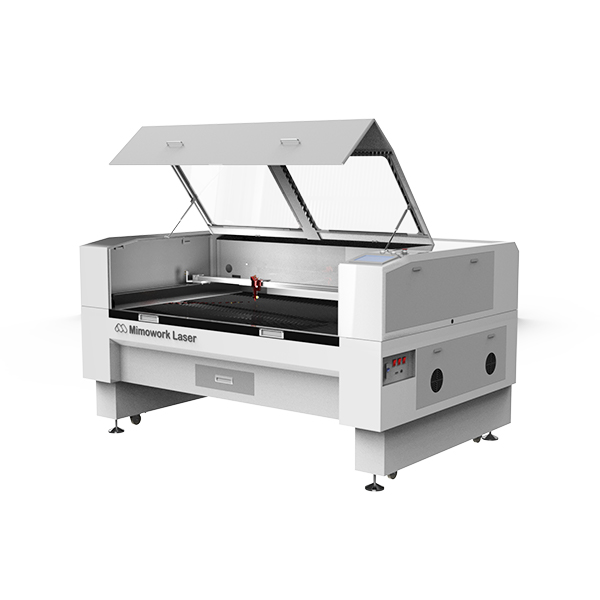
| Advantage | Description |
|---|---|
| High power (up to 300W) | Can cut very thick acrylic, expanding production diversity |
| Two-way pass-through design | Allows material wider than the cutting bed — ideal for long acrylic sheets |
| Multiple laser source options | CO2 glass tube (cost-effective) or RF metal tube (longer life, better beam quality) |
| Engraving precision | High precision down to 0.2mm line width with ±0.01mm repeatability — ideal for high-volume engraving of small-sized text |
| Suitable industries | Retail store signage, tournament brackets, small to medium advertising displays |
Laser Cutting and Engraving Two-Tone Acrylic Machine Recommendations
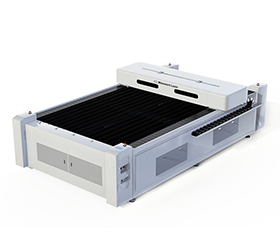
| Advantage | Description |
|---|---|
| Designed for | Large acrylic billboards and oversized wooden crafts |
| Four-way pass-through | Allows material to extend beyond the cutting bed from all sides |
| High-speed cutting | Up to 36,000 mm/min for efficient large-volume production |
| Engraving precision | Minimum clear text size recommended above 3mm; not suitable for micro-engraving (e.g., 0.2mm line width) |
| Suitable industries | Large-scale / batch production advertising displays, corporate signage, modern furniture |
Related Videos
How to Cut Oversized Acrylic Signage
This 1325 large-format CO₂ laser cutting machine tackles oversized acrylic with its pass-through design, handles 20mm thick sheets with 300W high power, and also delivers fine engraving on wood. It's a true all-in-one acrylic processing powerhouse — handling big jobs, thick jobs, and detail jobs with ease.
Laser Cutting & Engraving Acrylic Business
One CO₂ laser machine can create everything from acrylic LED displays to trophies and signage — and it also cuts wood, felt, and other materials. With small, medium, and large working table sizes available, plus training support from the brand, you can quickly start your acrylic business.
FAQ
A: Avoid standard glass cleaners unless they are explicitly labeled "Ammonia-Free" and "Alcohol-Free." Your safest bet is using a specialized acrylic cleaner like Novus No. 1 or simple soapy water.
A: Standard diode lasers (455nm blue light) cut much slower than CO2 lasers, meaning the laser dwells on the material longer. This prolonged heat exposure cooks the extruded acrylic substrate, creating more thermal stress and smoke condensation.
A:White or rough edges are usually caused by excessive heat or slow cutting speed. Try increasing the cutting speed or reducing the power to find a better balance. Also ensure that the air assist system is working properly to remove heat and molten debris in time.
A:It is not completely unusable, but extruded acrylic is better suited for cutting rather than engraving. If your project requires a clear white contrast effect from engraving, cast acrylic is recommended. Extruded acrylic is more prone to flames during cutting, and its engraving results are less ideal than those of cast acrylic.
Do you have any other questions about how to fix hazing on two-tone acrylic laser engraving and cutting?
Post time: Jul-10-2026