

Can You Laser Cut Polycarbonate? Practical PC Laser Cutting Settings & Tips
Yes, you can laser cut polycarbonate. However, you’ll typically see yellowing on the edges and a fair amount of sticky smoke. With proper control of frequency (PPI/Hz), focus position, and assist gas, the cut quality can be improved to a usable level.
One thing to keep in mind: if you’re expecting crystal-clear edges like acrylic, PC usually won’t get there without post-processing or switching materials.
Material Comparison: PC vs Acrylic
On the shop floor, PC behaves very differently from acrylic.
• PC: tough and impact-resistant, but tends to melt and yellow under laser
• Acrylic: more brittle, but vaporizes cleanly and gives clear edges
As a rule of thumb: use PC for functional parts, acrylic for visual parts.
Also note that PC comes in different variants—coated, UV-resistant, flame-retardant. These versions often require separate parameter tuning.
Common Issues When Laser Cutting Polycarbonate
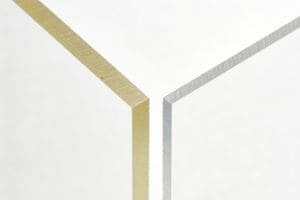
Yellowing (burn edges)
This is the most common issue and comes from heat buildup.
Most people adjust power first, but frequency (PPI) is the key factor:
• High frequency → more heat buildup → more yellowing
• Lower frequency → cooling between pulses → cleaner edges
Burning / chipping
Usually caused by:
• Incorrect focus position
• Too much energy in one spot
Slight defocus can help improve edge quality.
Smoke issues
Polycarbonate produces sticky smoke that:
• Builds up on lenses
• Reduces laser efficiency
In a production environment, this directly affects uptime and maintenance.
Practical Starting Parameters
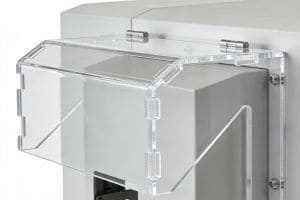
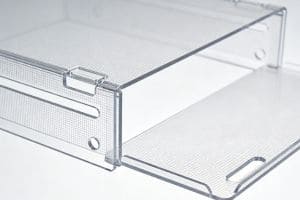
Here are practical starting points for test cuts:
The first step is to run 4–6 test samples and adjust from there.
| Thickness | Power | Speed (mm/s) | Frequency (kHz) |
|---|---|---|---|
| 1 mm (0.04") | 40–60W | 20–60 mm/s | 8–18 kHz |
| 2 mm (0.08") | 60–100W | 10–30 mm/s | 5–10 kHz |
| 3 mm (0.12") | 80–150W | 5–20 mm/s | 3–8 kHz |
Adjustment Logic
Change one thing at a time:
1. Too much charring? Drop frequency (kHz) and increase air/nitrogen pressure.
2. Not cutting through? Slow down by 10% or bump power by 5%.
3. Bottom edge looks messy? Drop your focus 1–2mm into the material.
Precision Laser Cutting for Clear Polycarbonate
Experience our advanced laser technology in action. This video demonstrates how we achieve crystal-clear, burr-free edges on polycarbonate sheets, from simple straight cuts to complex industrial geometries. Witness the perfect balance of speed and precision that ensures high-quality results for every project.
The Reality Check: Machine Choice
Don't get distracted by "fancy" options. Here is the shop-floor reality:
-
CO2 Laser (80W–150W): Your primary tool. It has the power to punch through 1–5mmsheets at production speeds.
-
UV Laser: Great for "cold cutting" but underpowered. Unless you are cutting ultra-thin films (<0.5mm), it’s too slow for a real workshop.
-
Fiber Laser: Not recommended for PC; the absorption rate is too low.
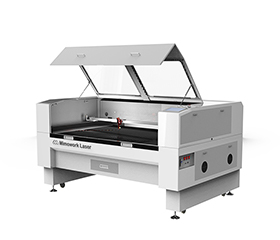
Clean Polycarbonate Cutting: Reduces yellow edges and melting for more stable cutting results.
Optimized Heat Control: Balances power, speed, and frequency to minimize heat buildup.
Consistent Material Processing: Handles different PC sheets with reliable cutting performance.
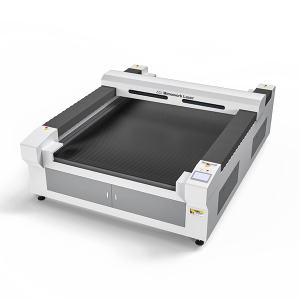
Large Format Cutting Area: 1300 × 2500 mm table handles oversized acrylic sheets and wood panels with ease.
High-Precision Motion System: Ball screw and servo drive ensure stable, accurate cutting at high speeds.
High-Power Cutting Capability: Equipped with 300W–500W CO₂ laser for processing thick solid materials.
Fix yellow edges and stabilize your PC cutting results.
FAQ
A: Technically yes, but we don't recommend it. Above 5mm, the heat buildup causes severe charring and a tapered edge. CNC is a better tool for thick PC plates.
A: It can be reduced by sanding or polishing, but it won't be as clear as acrylic. Using Nitrogen (N2) as an assist gas is the best way to minimize it during cutting.
A: Yes, PC fumes contain CO and benzene compounds. Ensure you have a high-volume exhaust system and an activated carbon filter.
A: Yes. Use high speed and low power to get a "frosted" white look. Avoid deep engraving, as it will melt the material.
A: The material won't absorb the fiber wavelength properly. It will either do nothing or create a messy, uncontrollable burn. Stick to CO2
A: Avoid laser cutting flame-retardant PC. The chemicals designed to stop fire will cause the edge to turn pitch black immediately.
A: Keep both sides on if possible. The top protects from smoke residue, and the bottom protects from bed reflections.
Request a test cut on your polycarbonate.
Send your material details and get a usable cutting setup.
Post time: Mar-18-2026